
/pl/eraport
/en/eraport
/pl/eraport
/en/eraport

SalesUP - eRaport™
SalesUP - eRaport™
SalesUP - eRaport™
Field work.
Data under control.
Field work.
Data under control.
eRaport™ brings schedules, tasks, photos and sales results together. It supports daily field work and helps managers coordinate activities from the office.
Employees report their activity, while managers review progress — in a browser or the iOS and Android apps.
eRaport™ brings schedules, tasks, photos and sales results together. It supports daily field work and helps managers coordinate activities from the office.
Employees report their activity, while managers review progress — in a browser or the iOS and Android apps.


eRaport™ - Availability
eRaport™ - Availability
One application. Every device.
eRaport™ works in a browser and through iOS and Android apps, supporting work in the field and in the office. Employees use their phones to check schedules, report tasks and add photo documentation, while coordinators review results on a computer or tablet. Keeping project data in one system makes it easier for the team to collaborate and monitor progress.


eRaport™ - Availability
One application. Every device.
eRaport™ works in a browser and through iOS and Android apps, supporting work in the field and in the office. Employees use their phones to check schedules, report tasks and add photo documentation, while coordinators review results on a computer or tablet. Keeping project data in one system makes it easier for the team to collaborate and monitor progress.
eRaport™ - Key features
eRaport™ - Key features
All your data. A complete view of the project.
eRaport™ brings sales results, working hours, completed tasks and photo documentation together in one place. Recording serial and IMEI numbers helps organise data on sold devices, while reports and trend analyses show the performance of products, locations and teams. This makes it easier to assess progress against targets, spot declining efficiency and plan action where the project needs additional support.
eRaport™ - Key features
All your data. A complete view of the project.
eRaport™ brings sales results, working hours, completed tasks and photo documentation together in one place. Recording serial and IMEI numbers helps organise data on sold devices, while reports and trend analyses show the performance of products, locations and teams. This makes it easier to assess progress against targets, spot declining efficiency and plan action where the project needs additional support.
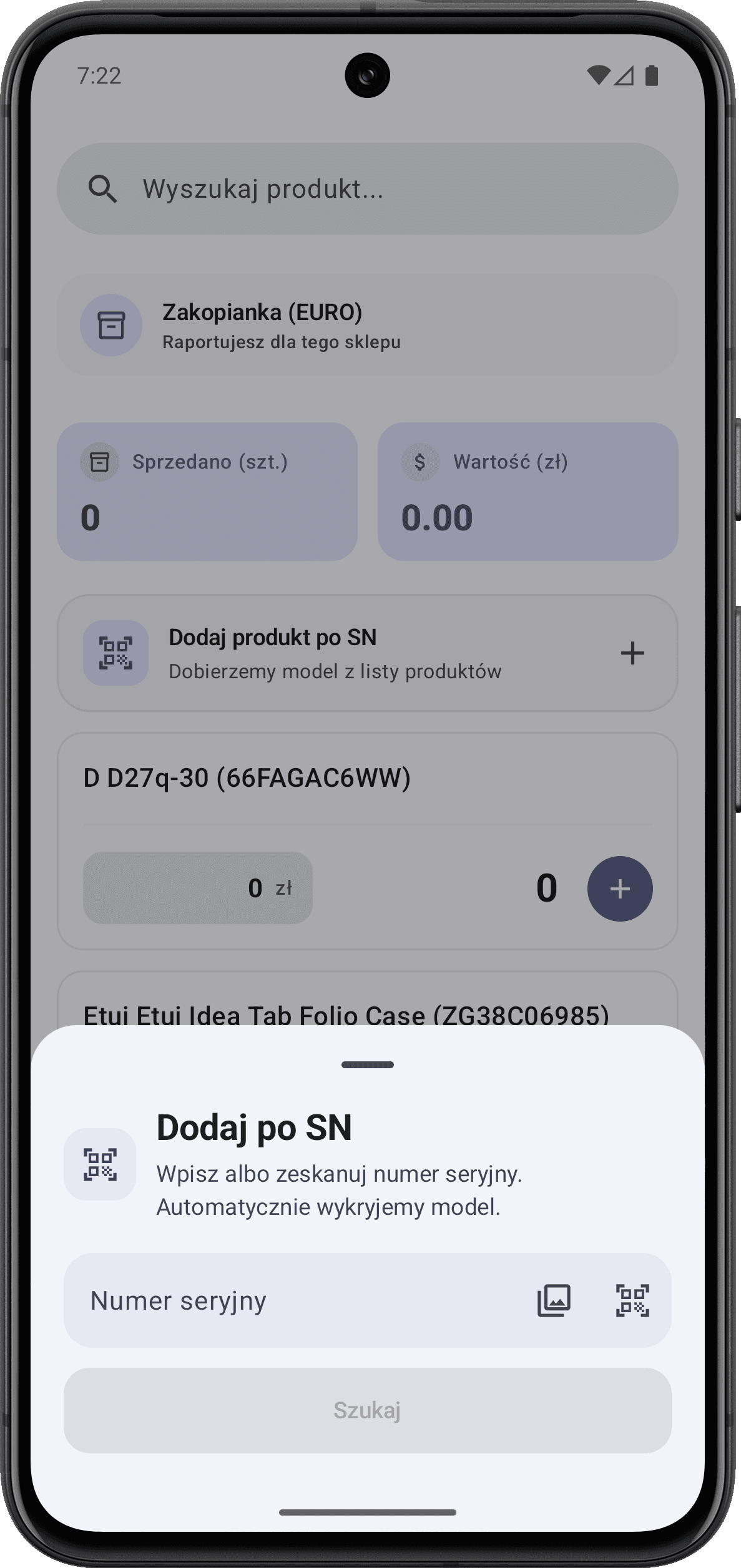
Tracking of serial and IMEI numbers
Complete work attendance records
Real-time location tracking
Sales and trend reports
Team performance analysis
Areas requiring improvement
Tracking of serial and IMEI numbers
Complete work attendance records
Real-time location tracking
Sales and trend reports
Team performance analysis
Areas requiring improvement
Tracking of serial and IMEI numbers
Complete work attendance records
Real-time location tracking
Sales and trend reports
Team performance analysis and rankings
Areas requiring improvement
Tracking of serial and IMEI numbers
Complete work attendance records
Real-time location tracking
Sales and trend reports
Team performance analysis and rankings
Areas requiring improvement
Tracking of serial and IMEI numbers
Complete work attendance records
Real-time location tracking
Sales and trend reports
Team performance analysis
Areas requiring improvement
Tracking of serial and IMEI numbers
Complete work attendance records
Real-time location tracking
Sales and trend reports
Team performance analysis
Areas requiring improvement
Tracking of serial and IMEI numbers
Complete work attendance records
Real-time location tracking
Sales and trend reports
Team performance analysis and rankings
Areas requiring improvement
Tracking of serial and IMEI numbers
Complete work attendance records
Real-time location tracking
Sales and trend reports
Team performance analysis
Areas requiring improvement
Tracking of serial and IMEI numbers
Complete work attendance records
Real-time location tracking
Sales and trend reports
Team performance analysis
Areas requiring improvement
Tracking of serial and IMEI numbers
Complete work attendance records
Real-time location tracking
Sales and trend reports
Team performance analysis and rankings
Areas requiring improvement
eRaport - Interface
Light Mode
A clean and easy-to-read interface designed for comfortable use throughout the day.
eRaport - Interface
Light Mode
A clean and easy-to-read interface designed for comfortable use throughout the day.



eRaport - Interface
Light Mode
A clean and easy-to-read interface designed for comfortable use throughout the day.
eRaport - Interface
Light Mode
A clean and easy-to-read interface designed for comfortable use throughout the day.
eRaport™ - Security
eRaport™ - Security
Your data. Access under control.
eRaport™ lets you control access to project data and organise information about sales, tasks and team activity. Password login and support for the biometric authentication available on the device make the app convenient to use in daily work. Authorised users can review results and documentation in one system, helping maintain control over information and coordinate the team’s activities.
Secure and convenient login
Secure and
convenient login
eRaport™ supports biometric authentication available on the device, including facial recognition and fingerprints. Saved login details make it easier to reopen the app.
eRaport™ supports biometric authentication available on the device, including facial recognition and fingerprints. Saved login details make it easier to reopen the app.
Password login
Fingerprint login
Face Recognition
Login
eRaport™ - Security
Your data. Access under control.
eRaport™ lets you control access to project data and organise information about sales, tasks and team activity. Password login and support for the biometric authentication available on the device make the app convenient to use in daily work. Authorised users can review results and documentation in one system, helping maintain control over information and coordinate the team’s activities.
Secure and convenient login
eRaport™ supports biometric authentication available on the device, including facial recognition and fingerprints. Saved login details make it easier to reopen the app.
Password login
Fingerprint login
Face Recognition
Login


eRaport — For users
Dashboard
Check your shift status, key tasks, and upcoming activities. All essential information and shortcuts are always at your fingertips.
eRaport — For users
Dashboard
Check your shift status, key tasks, and upcoming activities. All essential information and shortcuts are always at your fingertips.
eRaport — For users
Dashboard
Check your shift status, key tasks, and upcoming activities. All essential information and shortcuts are always at your fingertips.
eRaport — For users
Dashboard
Check your current shift status, key tasks
and upcoming activities. All essential
information and shortcuts are always
at your fingertips.
eRaport — For admins
Sales Report
Monitor your team’s sales results, analyse goal completion, and compare the performance of employees, products, and locations in one place.
eRaport — For admins
Sales Report
Monitor your team’s sales results, analyse goal completion, and compare the performance of employees, products, and locations in one place.
eRaport — For admins
Sales Report
Monitor your entire team’s sales results, analyse goal completion, and compare the performance of employees, products, and locations in one place.
eRaport — For admins
Sales Report
Monitor your team’s sales results, analyse goal completion, and compare the performance of employees, products, and locations in one place.


eRaport™ — Reports
eRaport™ — Reports
Sales and team activity reports.
eRaport™ reports show results for the whole project, individual teams and employees. Sales, target achievement and working hours can be reviewed together to compare performance and track changes over time. Analysing schedules, staffing and efficiency helps identify where support is needed, plan resources more effectively and base project decisions on data from the team’s daily work.
Sales and team activity reports.
eRaport™ reports show results for the whole project, individual teams and employees. Sales, target achievement and working hours can be reviewed together to compare performance and track changes over time. Analysing schedules, staffing and efficiency helps identify where support is needed, plan resources more effectively and base project decisions on data from the team’s daily work.

Team
Analysis
Team
Analysis

Employee
Analysis
Employee
Analysis
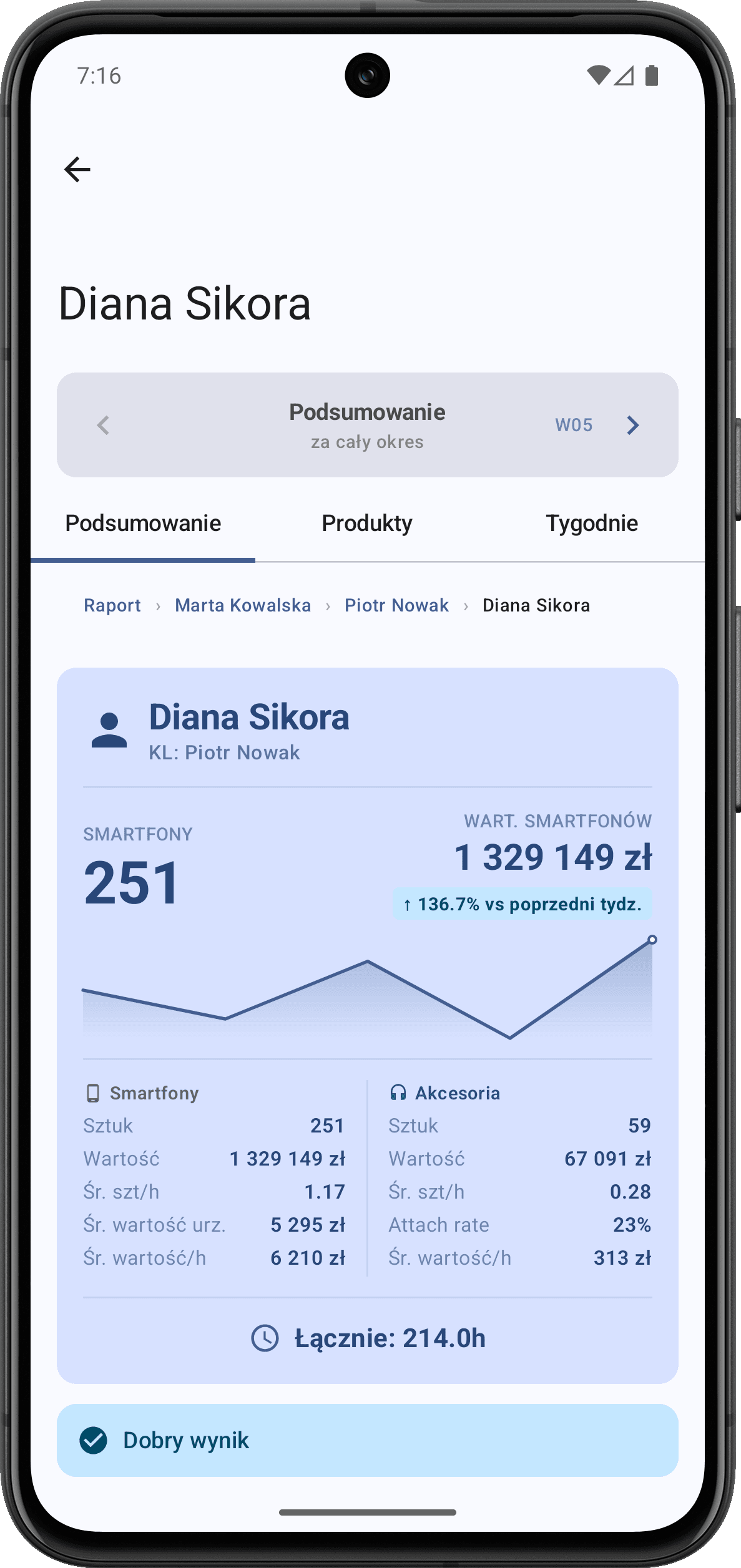
Employee
Summary
Employee
Summary

Employee
Sales
Employee
Sales

Sales
Trend
Sales
Trend

Project
Analysis
Project
Analysis

Performance
Analysis
Performance
Analysis
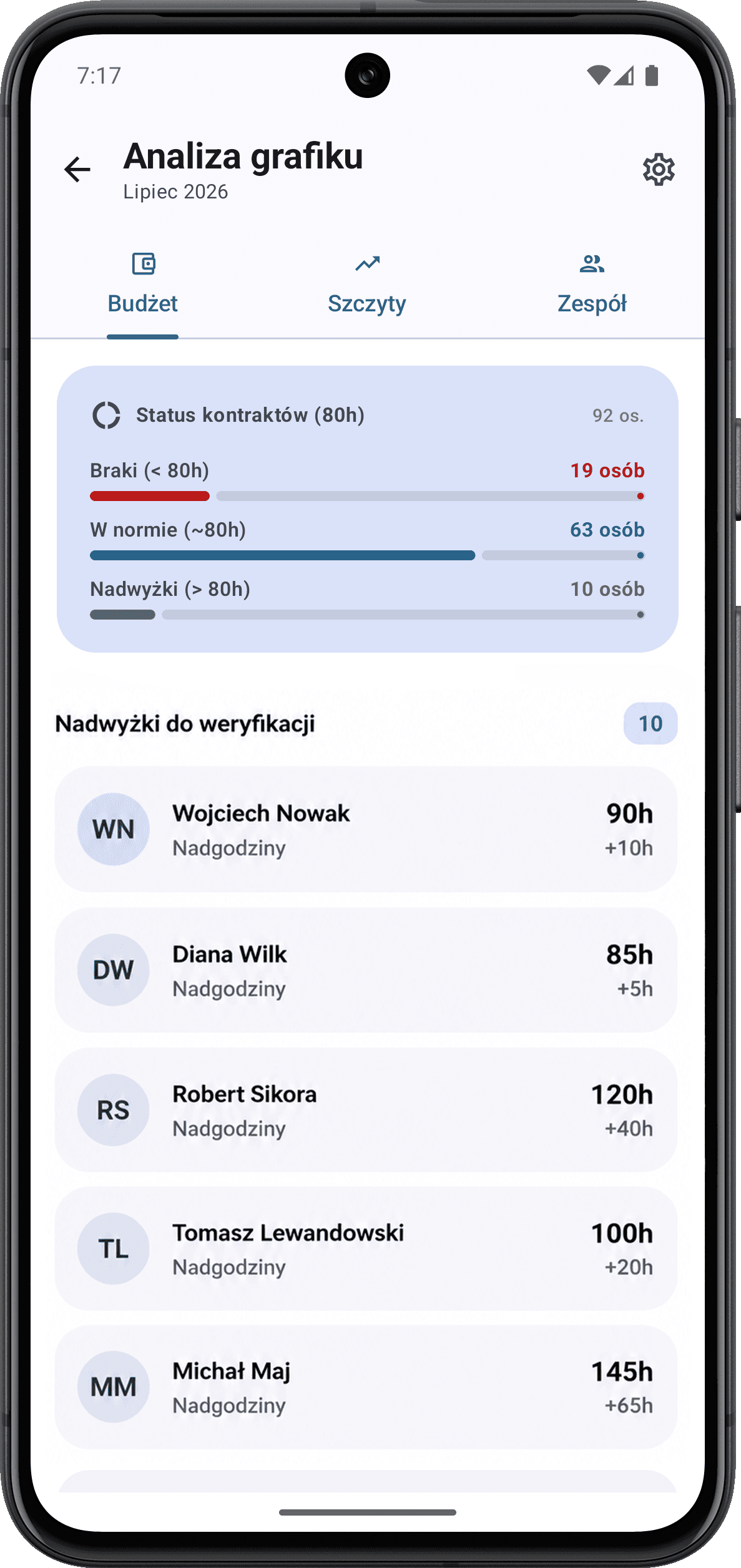
Schedule
Analysis
Schedule
Analysis
Team
Analysis
Team
Analysis
Employee
Analysis
Employee
Analysis
Employee
Summary
Employee
Summary
Employee
Sales
Employee
Sales
Sales
Trend
Sales
Trend
Project
Analysis
Project
Analysis
Performance
Analysis
Performance
Analysis
Schedule
Analysis
Schedule
Analysis
Team
Analysis
Employee
Analysis
Employee
Summary
Employee
Sales
Sales
Trend
Project
Analysis
Performance
Analysis
Schedule
Analysis
Team
Analysis
Employee
Analysis
Employee
Summary
Employee
Sales
Sales
Trend
Project
Analysis
Performance
Analysis